Yesterday I blogged about some of the online operating systems featured in PC Magazine's March 2008 article "The Best Free Software." Today I had a chance to evaluate some of the graphics programs they include in their list.
As an artist and art educator I have long had a love affair with Adobe Photoshop and for that matter most Adobe products but last summer when I first was introduced to GIMP I started to have a change of heart. I found GIMP inspiring because, just like most open source software, it leveled the playing field for those who cannot afford premium applications like Photoshop. However, I never really found myself using it. I still preferred Adobe because of the look and feel of the program. GIMP with all of its windows is cumbersome to manage. Commands are not located in the same place, or even very similar places as they are in Photoshop.
Today I found two other free programs that look and feel like Adobe Photoshop, offer the basic features that I use Photoshop for, and are more user friendly than GIMP. First is
Paint.net. According to their website this program was originally developed by an undergraduate student with the help of Microsoft. It was at one time slated to replace Paint as the free image editing software to come with the Windows OS. Why they did not go with it I am not sure. Now it is in open source. This program looks and feels like Paint but has the functionality of an early version of Adobe Photoshop.
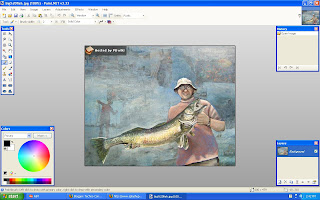
The only real problem I see with this program is it is only currently available on Windows. Our district is seriously looking at moving to Linux next year and if we do this program will not be supported.

The other program I found and am just ecstatic about is
Splashup.
Splashup is a flash based image editing program that looks almost exactly like Adobe Photoshop in your browser. It does all the basic things you need a good photo editor to do. Since it is web based you don't have to download anything. If you have an internet connection you can edit your photos. You also do not need to sign up for an account with
Splashup the way you do with other online image editing tools. Since it is flash based it is then also cross platform. The only downside to this application is that it cannot be downloaded.
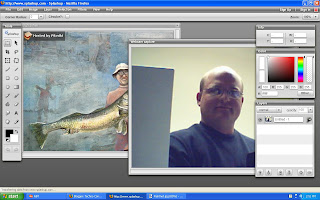
One cool feature that I like in
Splashup is the webcam capture feature as demonstrated in this picture. The only big problem I found with
Splashup is the inability to copy and paste between programs. I tried pasting this screen capture of
Splashup in
Splashup but it would not let me. I had to use
Paint.net to save this final screen cap.


